https://blog.jurep.dev/article/how-does-postgresql-handle-updates
How does PostgreSQL handle updates?
Why am I talking about this?#
Recently I had a bright idea of opening and scrolling LinkedIn to check what my colleagues are up to and I came across a post that caught my eye. Now I'm not here to name and shame individuals who make mistakes on the internet, but what really made me worried was the comments who all praised the information in the post as something revolutionary and I had to scroll pretty deep to find a person actually pointing out the issue.
So what is the issue?#
The post was comparing how updates work in PostgreSQL and Cassandra. In said post the user was claiming the difference is that PostgreSQL does an in-place update while Cassandra creates a new row for the updated data and leaves the old one as deleted. Now I don't have much experience with Cassandra but I do know my way around PostgreSQL since I use it professionally every day and I know for a fact that this is not how PostgreSQL works. So that brings us to the question in the title.
How does PostgreSQL handle updates?#
In order to understand updates we first need to understand how PostgreSQL actually stores data. PostgreSQL uses blocks of 8kB data by default. Every page follows the same layout with a header, item data, free space, actual items and then the special space. I wont be diving deep into page layouts in this article but what the important parts here are the item data, free space and items.
The item data is an array of identifiers that tells us where the row is located on the page. It contains the length of the row and the offset. Free space is where we can add new data if the data fits, and the items is the actual data.
Lets say we store an item with a size of 50 bytes into a page and then another item with a size of 75 bytes into the same page. This is what it would look like so you can picture it visually in the page
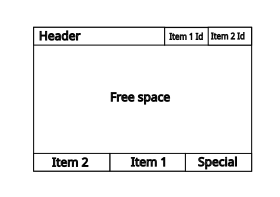
From this you can see that if we were to update the first item and the new size would be bigger than the old size, we would have to offset the second item as well. Now imagine if you had millions of rows and you update only one of them?
This is why PostgreSQL does something you would never expect. It creates a new row!
In practice you can see this being done by querying some system values. Lets say for example we have a simple todos table:
CREATE TABLE public.todos(
  id UUID PRIMARY KEY DEFAULT gen_random_uuid(),
  title TEXT NOT NULL,
  description TEXT NOT NULL,
  completed BOOLEAN DEFAULT FALSE
);
And we insert a todo into it:
INSERT INTO public.todos(title, description)
VALUES('Brush your teeth', 'Brush your teeth every morning and evening');
We can see our todo by running select:
postgres=# SELECT * FROM public.todos;
                  id                  |      title       |                description                 | completed
--------------------------------------+------------------+--------------------------------------------+-----------
 420e2aed-f5a0-4940-8369-70167b09ed1e | Brush your teeth | Brush your teeth every morning and evening | f
(1 row)
But if we add some system columns we can see more info about the row:
postgres=# SELECT xmin, ctid, * FROM public.todos;
 xmin | ctid  |                  id                  |      title       |                description                 | completed
------+-------+--------------------------------------+------------------+--------------------------------------------+-----------
  769 | (0,1) | fbd80d7f-89ab-4e8e-ac72-6e61b6562877 | Brush your teeth | Brush your teeth every morning and evening | f
(1 row)
The xmin column tells us the id of the latest transaction that touched this row and the ctid shows the location of the tuple on the disk (page, offset) which is (0,1) right now because this is the first record.
If we check the status of our todos table we can se we have one live tuple:
postgres=# SELECT relname, n_live_tup, n_dead_tup
FROM pg_stat_user_tables
WHERE relname = 'todos';
 relname | n_live_tup | n_dead_tup
---------+------------+------------
 todos   |          1 |          0
(1 row)
Now lets do a quick update of this todo and check the system columns again:
postgres=# UPDATE public.todos SET title = 'Brush your teeth 2' WHERE id = 'fbd80d7f-89ab-4e8e-ac72-6e61b6562877';
UPDATE 1
postgres=# SELECT xmin, ctid, * FROM public.todos;
 xmin | ctid  |                  id                  |       title        |                description                 | completed
------+-------+--------------------------------------+--------------------+--------------------------------------------+-----------
  770 | (0,2) | fbd80d7f-89ab-4e8e-ac72-6e61b6562877 | Brush your teeth 2 | Brush your teeth every morning and evening | f
(1 row)
As you can see the transaction id is different and the offset changed to 2 instead of 1. That is because we now have 2 records but the first one is marked as deleted because its the old version of the newly updated record.
If we check the status again:
postgres=# SELECT relname, n_live_tup, n_dead_tup
FROM pg_stat_user_tables
WHERE relname = 'todos';
 relname | n_live_tup | n_dead_tup
---------+------------+------------
 todos   |          1 |          1
(1 row)
You can see that now we have a dead tuple along with out live tuple. To get rid of the dead tuples PostgreSQL offers VACUUM which marks the dead tuples as reusable.
After running VACUUM we can see the dead tuple is gone:
postgres=# VACUUM public.todos;
VACUUM
postgres=# SELECT relname, n_live_tup, n_dead_tup
FROM pg_stat_user_tables
WHERE relname = 'todos';
 relname | n_live_tup | n_dead_tup
---------+------------+------------
 todos   |          1 |          0
(1 row)
Now this does not mean that the items were moved on the page, this just means the tuple can be used again. Lets try inserting another row:
postgres=# INSERT INTO public.todos(title, description) VALUES('Go to work', 'Go to the office and do your job so you can get paid');
INSERT 0 1
postgres=# SELECT xmin, ctid, * FROM public.todos;
 xmin | ctid  |                  id                  |       title        |                     description                      | completed
------+-------+--------------------------------------+--------------------+------------------------------------------------------+-----------
  770 | (0,2) | fbd80d7f-89ab-4e8e-ac72-6e61b6562877 | Brush your teeth 2 | Brush your teeth every morning and evening           | f
  771 | (0,3) | c22c00f6-2ccc-4b93-95e1-c18855ee5704 | Go to work         | Go to the office and do your job so you can get paid | f
(2 rows)
It takes the offset 3.
In order to rearrange the data again we need to use the VACUUM FULL command which will fix the offsets:
postgres=# VACUUM FULL public.todos;
VACUUM
postgres=# SELECT xmin, ctid, * FROM public.todos;
 xmin | ctid  |                  id                  |       title        |                     description                      | completed
------+-------+--------------------------------------+--------------------+------------------------------------------------------+-----------
  770 | (0,1) | fbd80d7f-89ab-4e8e-ac72-6e61b6562877 | Brush your teeth 2 | Brush your teeth every morning and evening           | f
  771 | (0,2) | c22c00f6-2ccc-4b93-95e1-c18855ee5704 | Go to work         | Go to the office and do your job so you can get paid | f
(2 rows)
And as you can see both of our records are now on offsets 1 and 2. VACUUM FULL is an expensive operation especially if you have tables with a lot of data so be mindful of when and how you use it.
I hope this post shined some light to how the updates actually work in PostgreSQL. Its actually not magic and if you dive deep enough it makes sense.